Aged 9 and up – ROBO Innovators | Robotics and Coding
ROBO INNOVATORS
FOR AGES 9 AND ABOVE
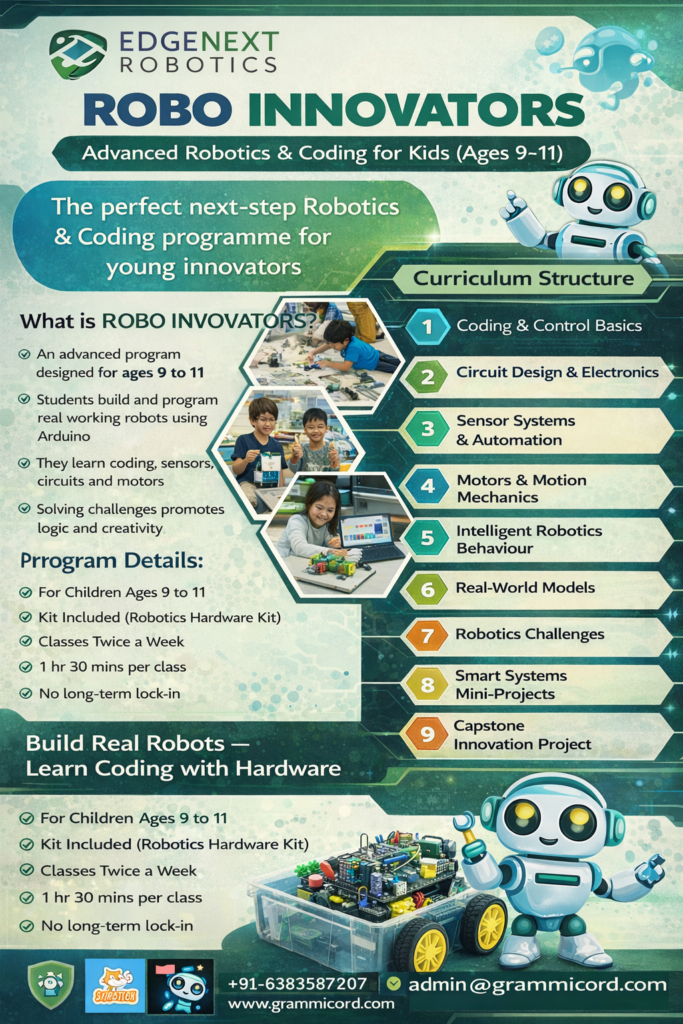
Robo Innovators helps children apply coding to real robotics projects while developing strong foundations in electronics, sensors, and logical thinking.
The ideal Robotics & Coding course for children ready to build real projects
What is ROBO Innovators ?
The Robo Innovators Program is designed for children aged 9 and above, who are ready to move beyond basics and start building real working robots using coding, sensors, and motors.
Students learn how software controls hardware while solving practical challenges through engaging, hands-on projects.
Ideal for students who have completed Kiddo Coder or beginners with strong curiosity.
🎯 Learning Outcomes
By the end of this program, students will:
-
Understand how microcontrollers work
-
Write block-based and beginner text-based code
-
Connect and control sensors and motors
-
Build functional robotic systems
-
Solve real-world engineering problems
-
Develop logical and creative thinking
🧠 Course Structure
9 Progressive Learning Phases
🔹 Phase 1: Foundations of Coding & Control
Students Learn:
• How computers and robots follow instructions
• Block-based coding logic (sequence, loops, events)
• Introduction to hardware control
Projects:
✔ LED blink patterns
✔ Button-controlled circuits
Outcome
🎯 Outcome: Strong coding logic foundation
🔹 Phase 2: Circuit Design & Electronics Skills
Students Learn:
• Power flow in circuits
• Safe wiring techniques
• Digital & analog signals
Projects:
✔ Multi-LED light systems
✔ Alarm buzzer circuit
✔ Switch-based controls
Outcome
🎯 Outcome: Confidence with electronics
🔹 Phase 3: Sensors & Smart Reactions
Students Learn:
• How sensors detect the environment
• Distance measurement concepts
• Light & obstacle detection
Projects:
✔ Smart distance alert
✔ Automatic light system
✔ Obstacle indicator
Outcome
🎯 Outcome: Understand automation logic
🔹 Phase 4: Motors & Movement Mechanics
Skills Developed
• Distance measurement
• Light detection
• Obstacle detection
• Data reading in code
Projects
✔ Automatic night lamp
✔ Smart distance alert
✔ Obstacle alarm system
✔ Light-based automation model
Outcome
🎯 Outcome: Sensors → decisions → action
🔹 Phase 5: Logic & Problem Solving with Code
Skills Developed
• Motor drivers
• Speed control using code
• Direction control
• Sensor-triggered motion
Projects
✔ Line-avoidance robot
✔ Obstacle-triggered stop robot
✔ Smart moving robot with alerts
✔ Speed-controlled robot
Outcome
🎯 Outcome: Motion + intelligence combined
🔹 Phase 6: Autonomous Robotics
Skills Developed
• If-else logic
• Loops
• Multi-sensor decision making
Projects
✔ Smart parking system
✔ Automatic door/gate model
✔ Safety alert robot
✔ Smart dustbin
Outcome
✔ Robotics Movement experience
✔ Strong excitement & confidence
🔹 Phase 7: Mini Engineering Challenges
Skills Developed
• Testing & improvement
• Precision control
• Creativity
Challenges
✔ Speed challenge
✔ Obstacle maze robot
✔ Sensor accuracy challenge
✔ Design improvement task
Outcome
🎯 Outcome: Engineering mindset
🔹 Phase 8: Real-World Applications
Skills Developed
• Combining systems
• Advanced logic
• Automation
Projects
✔ Smart traffic light system
✔ Home safety model
✔ Smart lighting automation
✔ Mini smart city model
Outcome
🎯 Outcome: System-level thinking
🔹 Phase 9: Capstone Innovation Project
Students Create:
• Their own robotics project idea
• Design → build → present
Examples:
✔ Smart city mini model
✔ Home automation prototype
✔ Creative robotics solution
Outcome
🎯 Outcome: Confidence + creativity + portfolio
🛠️ Project Portfolio (What Students Build)
🛠 Robo Innovators – Project Portfolio
Real Robotics & Smart Technology Builds
Throughout the Robo Innovators programme, students complete a wide range of hands-on projects that gradually progress from basic electronics to intelligent robotics systems. Each project is designed to strengthen coding skills, technical understanding, and creative problem-solving.
⚡ Coding & Electronics Projects
-
Programmable LED pattern system
-
Electronic quiz buzzer
-
Smart alarm circuit
-
Multi-switch control board
-
Reaction timer game
-
Automatic lighting system
📡 Sensor-Based Smart Projects
-
Automatic night lamp (light sensor based)
-
Distance measuring system (ultrasonic)
-
Obstacle alert system (IR sensor)
-
Smart proximity alarm
-
Light-controlled automation model
🚗 Robotics & Motion Projects
-
Basic moving robot
-
Speed-controlled robot
-
Direction-controlled robot
-
Obstacle-stopping robot
-
Obstacle-avoiding robot
-
Smart navigation robot
🏙 Real-World Application Models
-
Smart parking assistance model
-
Automatic door/gate system
-
Smart dustbin project
-
Home safety alert system
-
Traffic light automation model
🚀 Innovation & Challenge Builds
-
Maze-solving robot
-
Precision movement challenge robot
-
Speed optimization robot
-
Creative robotics design challenge
🧠 Capstone Student Projects (Examples)
Students design their own robotics solution, such as:
-
Smart home mini system
-
Safety monitoring robot
-
Automated city model
-
Problem-solving robotics prototype
📸 Portfolio & Showcase
Each student maintains a project portfolio including:
✔ Photos & videos of builds
✔ Code samples
✔ Project explanations
Parents are invited to project showcase days to see real progress.
🕒 Course Detail
🕒 Learning Duration
-
Flexible month-by-month learning
-
Students progress phase-by-phase
-
⏱ Duration: 1.5 hours per session
-
📅 2 sessions per week
- Frequent progress updates
💰 Fees Structure
🎓 Certification & Progress
- Certificate of Completion
- Project Showcase
- Internal Competition
- Move to Smart Tech Series (Ages 11–13)
- Obstacle Avoiding Robot
- Bluetooth Controlled Robot Car
- Smart Distance Alert System
- Automatic Night Lamp
- Touch Controlled Light System
- Sound Activated Switch
- Smart Parking Assistance System
- Temperature & Humidity Monitor
- Soil Moisture Based Plant Water Alert
- Rain Detection Alarm
- Servo Motor Controlled Gate
- Smart Dustbin Project
- Height Measurment using OLED
- Joystick Controlled Robot
- Electronic Reaction Game
- Traffic Light Automation System
- IR Based Object Counter
- Wireless Control Using Bluetooth App
- Smart Home Light Control System
- Ultrasonic Radar Display System
- Human Follower
- Line Follower
- Arduino Nano + USB Cable
- Breadboard
- 10 LEDs + Resistors
- Buzzer & Buttons
- LDR Sensor
- Ultrasonic Sensor
- IR Obstacle Sensor
- Servo Motor
- Jumper Wires
- DC Motor
- Mini Screwdriver
- Robot Car Chassis
- L298N Motor Driver Module
- Bluetooth Module (HC-05)
- 0.96 inch OLED Display
- 7-Segment Display
- Joystick Module
- Rain Sensor
- Soil Moisture Sensor
- Touch Sensor
- Sound Sensor
- DHT11 Temperature & Humidity Sensor
Note: Kit contain only electronic components (kids safe). No pre-built plastic or 3D project models are included. Cardboard models may be used in class for certain activities.
Course Flyer